Solutions
Four jobs, one Botify, the same controls.
Root-cause analysis, stakeholder reports, email and phone calls. Each runs on the same Botify setup, with the same tools, policies and audit trail, in Arabic or English.
01
Find what caused an incident
Pulls signals from Dynatrace, Splunk and ServiceNow onto one timeline so you see what changed.
- Evidence time-aligned
- Entities linked across tools
- Findings you can trace
Tools it uses
dynatrace.list_problemsRuns directlydynatrace.list_deploymentsRuns directlysplunk.run_spl_searchRuns directlyservicenow.list_changes_near_timeRuns directlycorrelation.find_entityRuns directlyFinds the same service, host or application across every connected system.
correlation.time_window_overlapRuns directlyChecks which events overlap in time, with a tolerance for systems whose clocks disagree.
correlation.evidence_fetchRuns directlyRetrieves the full evidence captured earlier in the run, so every finding traces back to its source.
Every tool here only reads. Botify investigates without changing anything in your systems.
Three tools, three timelines
One window, one likely cause
- Change CHG0031 approved09:20
- Deployment v2.14.009:38
- Problem P-2409 opened09:42
- 5xx spike · 1,284 errors09:45
Likely cause
High confidenceDeployment v2.14.0
correlation.time_window_overlap
- 09:20
Change CHG0031 approved
ServiceNow
- 09:38
Deployment v2.14.0
Dynatrace
- 09:42
Problem P-2409 opened
Dynatrace
- 09:45
5xx spike · 1,284 errors
Splunk
Likely cause
High confidenceDeployment v2.14.0
correlation.time_window_overlap
02
Reports stakeholders can open
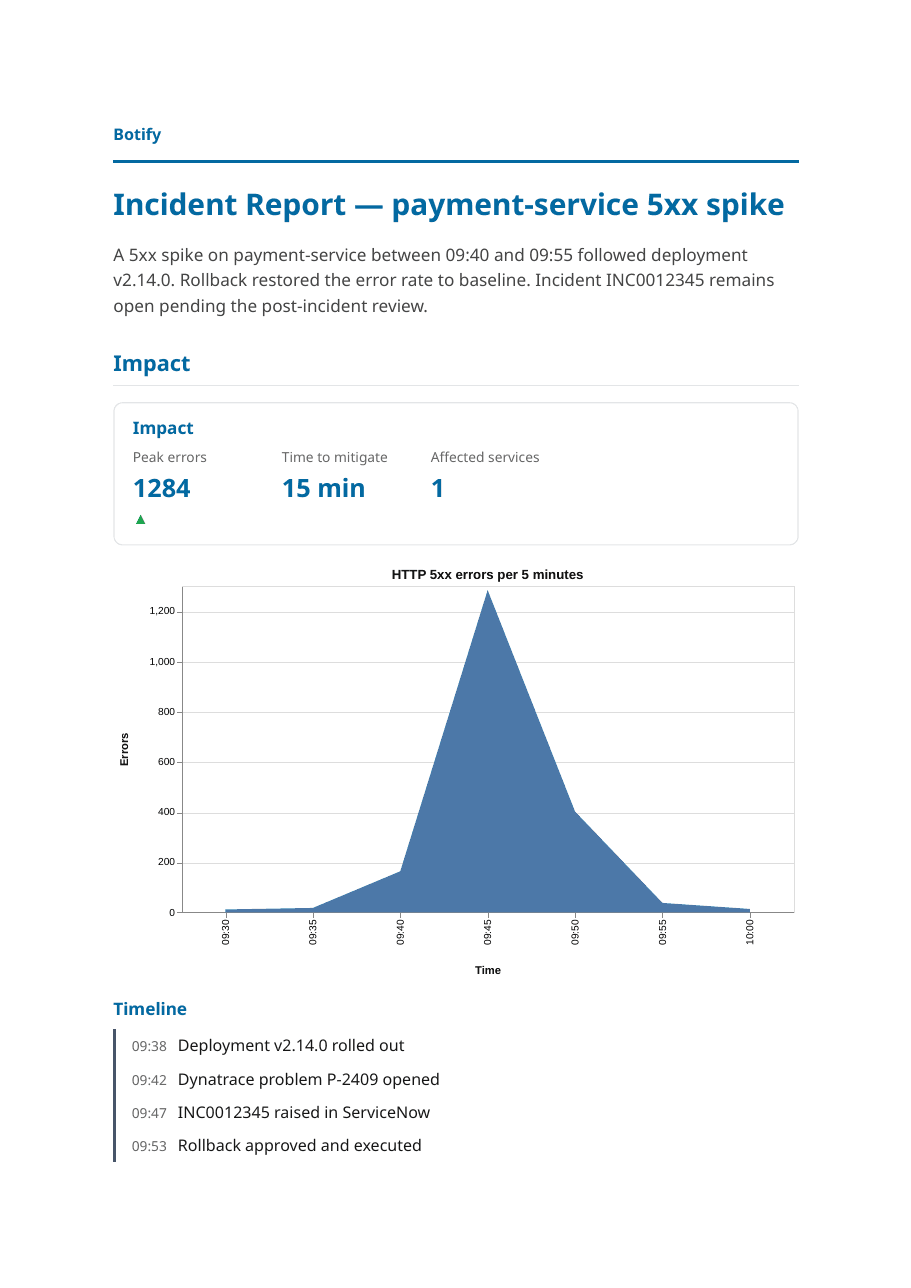
Turn an investigation into PDF, Excel, Word or CSV — Arabic or English.
- PDF, XLSX, DOCX and CSV
- Right-to-left for Arabic
- Charts from real data
Tools it uses
artifact.createYour policy decidesartifact.renderYour policy decidesaudio.narrate_artifactYour policy decides
Creating, rendering and narrating a report follow the rules your team sets for each setup.
artifact.render03
An inbox helper that asks first
Searches, summarises and drafts in Gmail. Sending waits for your approval.
- Search, read, label and draft
- Send only after approval
- Arabic or English drafts
Tools it uses
gmail.searchRuns directlygmail.get_threadRuns directlygmail.create_draftYour policy decidesgmail.sendWaits for approval
Searching and reading run directly, drafting follows your policy, and sending always waits for a person.
 Gmail· Draft
- To
- payments-leads@company.com
- Subject
- payment-service incident: status and next steps
Hi team, the 09:40 failures on payment-service trace back to deployment v2.14.0. It has been rolled back and error rates are at baseline. INC0012345 stays open for the review on Thursday.
04
Voice and phone, same Botify
Talk in the browser or over the phone — same tools and policies as chat.
- Arabic and English speech
- Outbound and inbound calls
- Country and recipient limits
Tools it uses
phone.callWaits for approvalphone.transferYour policy decidesphone.end_callRuns directly
Every outbound call waits for approval, and only reaches the countries you allow. Premium-rate destinations are always blocked.
Outbound call
+966 5• ••• ••12
- Botify
Hello, this is Botify calling about incident INC0012345.
- On-call
Go ahead, what is the status?
- Botify
The deployment was rolled back and errors are back to normal.
phone.callPick the first job to hand over.
Root cause, reports, email or calls: start with the one that costs your team the most hours. We set it up on your systems and run it with you, approvals included.